PC tactical suite

ARMA REFORGER Cheats for PC — Aimbot, Player ESP & Wallhack

Customizable aimbot, player ESP, skeleton overlays, and config tools for ARMA REFORGER multiplayer on PC—with Cloud DMA compatibility and multi-language menu support.

4

Aimbot bones

EN/RU/CN

Languages

2

ESP styles

Yes

Config slots

ESP Active
Radar Online
Season Build
Undetected
Soft Aim Ready
No Recoil
Stream Proof
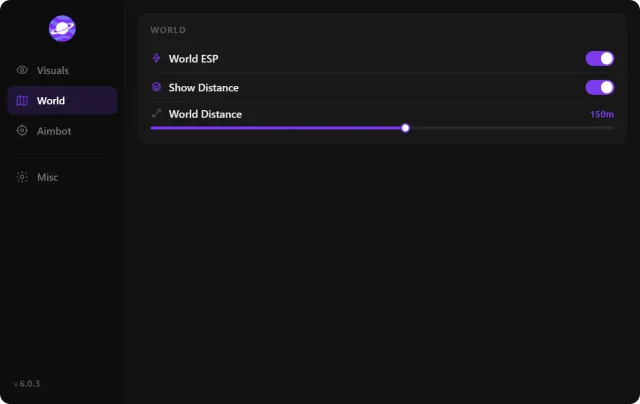
Loot ESP
Skeleton ESP
UAV Radar
Map Hack
24/7 Support
Instant Delivery
Ranked Safe
Trigger Bot
Bone Select
Live Status
Auto Updates
Windows 10 & 11
ARMA REFORGER
Cloud DMA
Config profiles
Multi-language
Secure checkout
External suite
Operator guides

Features

Everything in one tactical package

Aimbot, player visuals, and misc tools organized for ARMA REFORGER PvP.

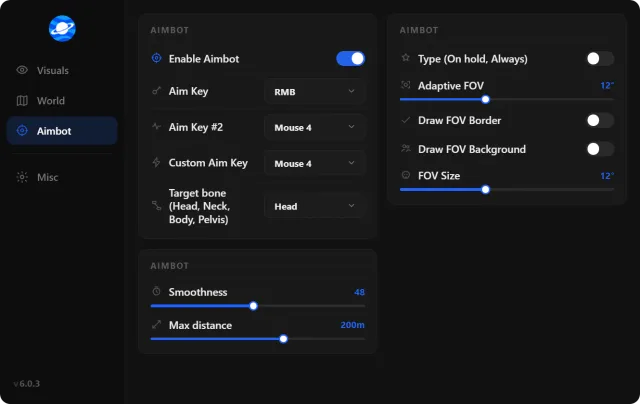
Aimbot Options

Precision when you need it.

Full aimbot tab with hold or always-on modes, bone selection, and adaptive FOV you can tune per map.

  • Enable Aimbot and custom aim key
  • Target bone: Head, Neck, Body, Pelvis
  • Type: On hold or Always
  • Adaptive FOV with border and background draw
  • FOV size, smoothness, and max distance
Player Visual Options

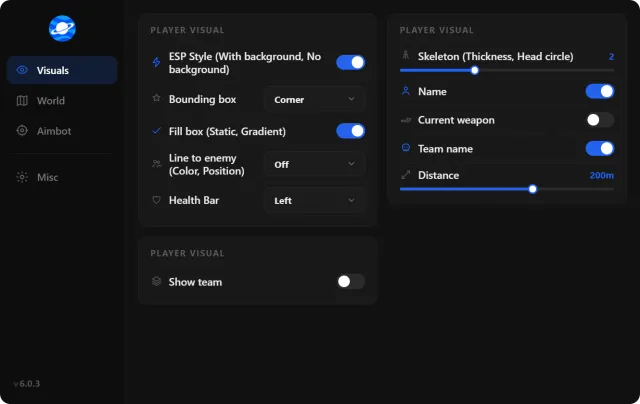
Clear ESP at range.

Wallhack-style player ESP with boxes, health bars, skeletons, and weapon readouts that stay readable in firefights.

  • ESP style with or without background
  • Bounding box: Box or Corner modes
  • Fill box: Static or Gradient
  • Line to enemy with color and position
  • Health bar: Static, Health based, or Gradient

Soldier intel

Know who you face.

Name tags, current weapon, team name, distance, and show-team filters help you pick engagements wisely.

  • Skeleton thickness and head circle
  • Name, weapon, and team name overlays
  • Distance readouts on every target
  • Show team toggle for mixed fights

Misc Options

Comfort and control.

Keybinds, performance caps, watermark, and named configs keep your layout consistent between sessions.

  • Menu and unload keybinds
  • DPI scale and FPS limit
  • Watermark on or off
  • Language: EN, RU, CN

Config manager

Save what works.

Create, load, rename, and delete configs so ranked and casual presets never overwrite each other.

  • Create config from current sliders
  • Load config before you deploy
  • Rename configs for squad roles
  • Delete outdated profiles safely

Cloud DMA

External workflow.

Built for Cloud DMA-compatible rigs—review hardware requirements on the product page before checkout.

  • External suite architecture
  • Setup notes in product docs
  • Status checks before launch
  • Conservative defaults recommended

FOV drawing

See your aim cone.

Optional FOV border and background help you line up adaptive aimbot ranges without guessing.

  • Draw FOV border toggle
  • Draw FOV background toggle
  • Pairs with smoothness sliders

Performance

Stable frame times.

FPS limit and DPI scale keep overlays sharp on 1080p through 4K without tanking your rig.

  • FPS limit slider
  • DPI scale for menu clarity
  • Unload keybind for quick disable

On-page guides

Learn before you queue.

Blog and forum posts cover aimbot tuning, ESP clutter reduction, and Cloud DMA prep.

  • Aimbot setup walkthrough
  • ESP layout examples
  • Purchase and install FAQ

Products

ARMA REFORGER Cheats for PC

ARMA REFORGER cheats, Cloud DMA, and HWID Spoofer—each with its own checkout.

Why us

Tactical tooling with readable overlays

Many cheat sites dump sliders without structure. ARMA Cheats groups aimbot, ESP, and misc settings the way ARMA REFORGER players actually configure them.

  • Organized feature tabs

    Aimbot, player visuals, and misc options map directly to the product feature list—not random toggles.

    ARMA Cheats
    Typical provider
  • Conservative defaults

    Smoothness, FOV, and ESP distance start readable so you can tune up instead of fixing a messy first launch.

    ARMA Cheats
    Typical provider
  • Config profile support

    Create, load, rename, and delete configs for different maps or squad roles without rebuilding from scratch.

    ARMA Cheats
    Typical provider
  • Multi-language menu

    EN, RU, and CN language options keep the suite usable for international communities.

    ARMA Cheats
    Typical provider
  • Cloud DMA documentation

    Hardware expectations are documented on the product page before you commit to checkout.

    ARMA Cheats
    Typical provider
  • Secure checkout flow

    Buy buttons route through internal /go/ paths so affiliate URLs stay off visible hover text.

    ARMA Cheats
    Typical provider

30+

Feature toggles

Covering aimbot, ESP, skeleton, health, weapon, team, and config controls.

3

Menu languages

English, Russian, and Chinese interface options.

6

Gameplay screenshots

Real menu and in-game ESP examples across this site.

Setup guide

From checkout to your first config in just three simple steps

Purchase, confirm Cloud DMA requirements, load a conservative preset, and test ARMA REFORGER before you join public multiplayer.

  1. Review requirements

  2. Checkout & portal access

  3. Load a preset & test

How it works

From status check to saved profile.

A straight path from purchase to an ARMA REFORGER config you can reuse every session.

4 easy steps

  1. 01

    Check status

    Read the live banner on armacheats.org before you buy or launch.

  2. 02

    Complete checkout

    Use Buy Now to reach secure checkout and save your license email.

  3. 03

    Launch & configure

    Load a conservative preset and tune aimbot smoothness plus ESP distance.

  4. 04

    Save your config

    Rename and store the profile once sliders feel right for your main mode.

Blog

Guides and updates

Aimbot tuning, ESP layouts, Cloud DMA notes, and checkout walkthroughs for ARMA REFORGER.

Configure hold vs always-on aimbot, pick target bones, and draw adaptive FOV without overshooting.

Balance corner boxes, gradient fills, skeleton thickness, and team filters for clear wallhack-style overlays.

What Cloud DMA compatibility means and what to verify on your PC before checkout.

FAQ

Questions about this page

Answers tied to what you are reading—visit the FAQ page for every topic.